What Is a Search Engine and How Does It Work?
Try Thryv for FreeBy Clint Fontanella, Small Business Expert
Updated November 3, 2026 · 35 min read
Key Takeaways
- Search engines find and rank information online. That ranking shapes which local businesses customers see and call.
- Google Maps, website results, and AI answers work differently, so appearing in one doesn’t guarantee visibility in the others.
- Start by checking where your business shows up, then fix what’s holding it back, such as an outdated listing or a thin service page.
Stand Out Where Customers Search
Get found in local searches, build trust with reviews and keep your business looking its best online — all from one platform.

You know customers are searching Google for services like yours, but why do competitors show up while your business is harder to find?
A search engine is a tool that finds information online and ranks it by how well it answers a search. It works in three steps: crawling, indexing, and ranking. When someone searches for “plumber near me,” Google decides which businesses appear on the map and which websites appear below it. It may also add an AI-generated answer.
Understanding how search engines work can help you identify why your business might be missing from certain results and what you can do about it. Below, you’ll see how Google decides what to show and where to focus first.
What is a search engine?
A search engine is an online tool that finds and organizes information from across the World Wide Web so people can discover relevant websites, businesses, images, videos, and other content. When someone enters a question or search phrase into a search interface, the search engine identifies matching information and displays relevant results.
Common web search engines include Google, Bing, Yahoo, DuckDuckGo, and Brave Search. Google is the most widely used, accounting for approximately 90% of the global search engine market, according to StatCounter.
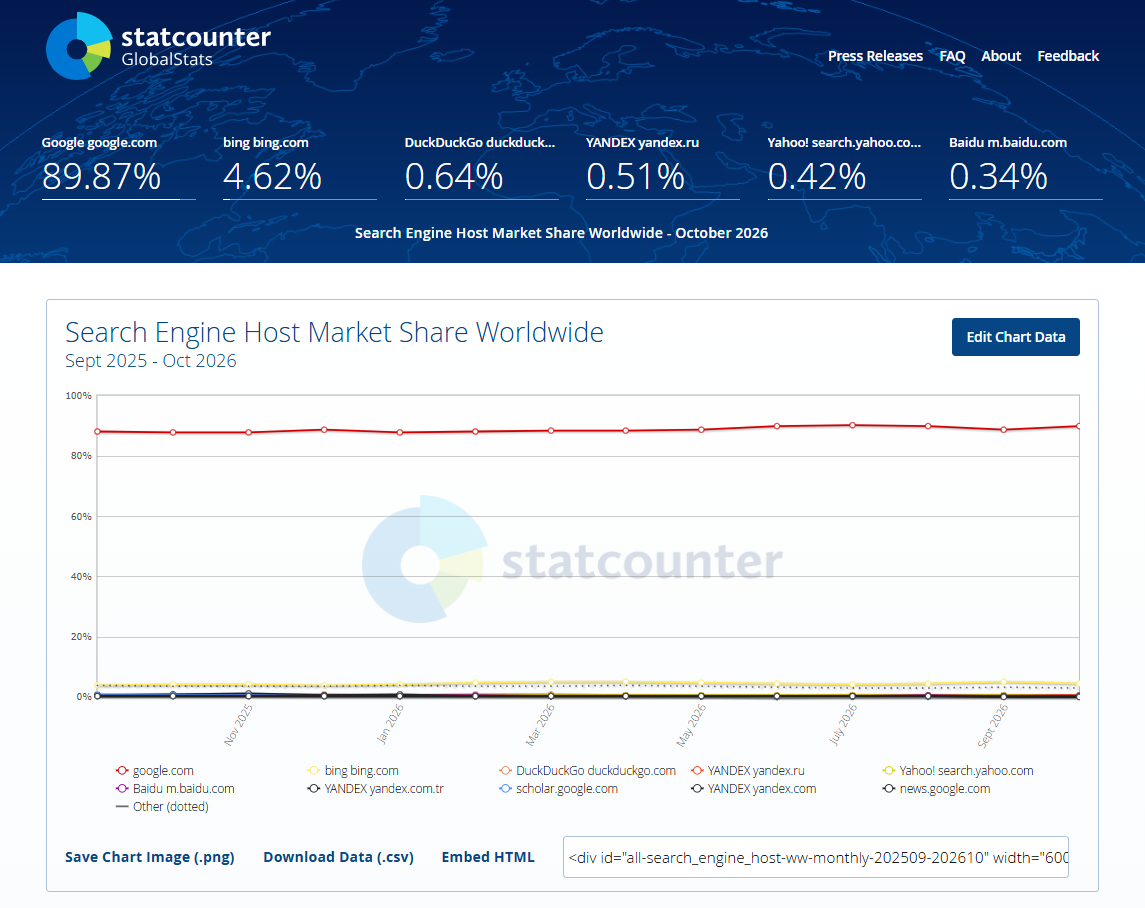
Other tools help people find information in different ways. Google Maps focuses on businesses and locations, while AI tools like ChatGPT can answer questions and search the web when search capabilities are available.
For local businesses, search results can include a Google Business Profile, customer reviews, service pages, and contact information. Each gives potential customers information they can use to decide which business meets their needs.
How does a search engine work?
Search engine technology uses automated systems to discover information, organize it, and determine which results best match someone’s search. Web search engines handle these tasks through three main stages: crawling, indexing, and ranking.
Crawling: how Google finds your pages
Web crawling is how search engines discover web pages. Google uses an automated program called a web crawler to follow links between pages and check websites for new or updated content.
Say you own a roofing company and publish a new page about emergency roof repairs. Google’s web crawler might discover that page by following a link from your homepage or another page on your website.
Publishing a page doesn’t mean Google will find it right away. Linking to new service pages from your website’s navigation or other relevant pages helps make them easier for search engines to discover.
Indexing: how Google stores and understands pages
Once Google discovers a page, it analyzes the content to understand what it’s about. If the page meets its requirements, Google may add it to its search engine index, a collection of information about web pages that can appear in search results.
For your roofing business, Google might recognize that the new page covers emergency roof repairs, including the services you provide and the areas you serve.
Not every discovered page gets indexed. If your page isn’t appearing in Google at all, you can use Google Search Console to check whether it’s indexed and identify potential problems.

Small Business SEO & AEO Visibility Checklist
Free Guide
Small Business SEO & AEO Visibility Checklist
Optimize your business for search engines, AI answers, and zero-click discovery. Use this step-by-step checklist to improve visibility, strengthen trust signals, and turn online searches into real customer inquiries.
Ranking: how Google decides what shows first
When someone searches for “emergency roof repair near me,” Google uses ranking algorithms to evaluate indexed pages and determine which results are most relevant and useful.
These systems consider factors such as how closely the content matches the search, the quality of the information, website usability, and the searcher’s location. They also evaluate user intent, or what someone is trying to accomplish with their search.
Your roofing page might appear for searches in your service area but rank differently for someone farther away or searching for another roofing service.
If your page is indexed but doesn’t appear prominently, improving its content and performance through SEO (search engine optimization) can help search engines understand your services and make your pages more relevant to potential customers.
Website rankings are only part of the picture. Local searches can also display paid ads, Google Maps listings, and AI-generated answers.
What shows up when someone searches for a local business?
Search for “plumber near me,” and Google may show paid ads, businesses on a map, regular website listings, and AI-generated answers. This is called a search engine results page (SERP), and what appears depends on your location, device, and search terms.
Understanding the differences can help you identify where your business appears and what you can do to improve its visibility.
Paid ads: sponsored search results and Local Services Ads
Some businesses pay to appear in search results. Google offers two common advertising options:
- Google Search Ads: Sponsored website listings that appear for relevant search queries. Placement depends on factors such as bids, ad quality, and relevance.
- Local Services Ads: Ads for eligible service businesses that can display reviews, contact details, and applicable verification badges. Placement depends on eligibility, responsiveness, customer reviews, and other ranking factors.
Advertising can help you reach customers searching for your services, but paying for ads doesn’t directly improve your organic search rankings.
The Google map pack: businesses shown with a map
The Google map pack displays a small group of local businesses alongside a map. Customers can compare reviews, check locations or service areas, and contact businesses directly.
Google primarily uses three factors to determine which businesses appear:
- Relevance: How closely your business matches the customer’s search. Choosing accurate business categories and listing your services helps Google understand what you offer.
- Distance: How close your business is to the searcher’s location or the area they’re searching. You can keep your address or service area accurate, but you can’t control where customers search from.
- Prominence: How established your business appears based on factors such as reviews, links, and other information Google finds online. Genuine customer reviews and a consistent online presence can help.
If your business doesn’t appear on Google Maps at all, start by checking whether your Google Business Profile is verified, accurate, and eligible to appear.
If your business appears on Maps but isn’t among the first few results, review your categories, services, and reviews. Distance and competition may also affect your ranking, so appearing in the map pack isn’t guaranteed.
Keeping your details accurate through online listings management can also help customers find reliable information about your business across directories.
Free Checklist: Visibility Checklist 2026
Free Guide
Free Checklist: Visibility Checklist 2026
Build a stronger online presence with a practical checklist designed to improve your visibility across search engines, maps, social media, reviews, and AI-powered search. Learn how to strengthen the trust signals that help customers find, choose, and confidently do business with you.
Organic results: regular website listings
Organic results are unpaid website listings Google selects based on relevance, content quality, and other ranking factors.
For example, a plumbing company’s water heater repair page might appear for local search queries about that service, even if the company isn’t featured in the map pack.
If your website isn’t appearing for an important service, first check whether the relevant page is indexed. Then review whether it clearly describes the service, answers customer questions, and identifies the areas you serve.
AI Overviews: Google’s AI-generated answers
An AI Overview is a Google-generated summary that may appear for certain searches. It brings together information from relevant sources and can include links to supporting websites.
A 2025 Pew Research Center study found that users clicked traditional search results on 8% of visits when an AI summary appeared, compared with 15% when one didn’t. This suggests customers may get information directly from search results without visiting as many websites.
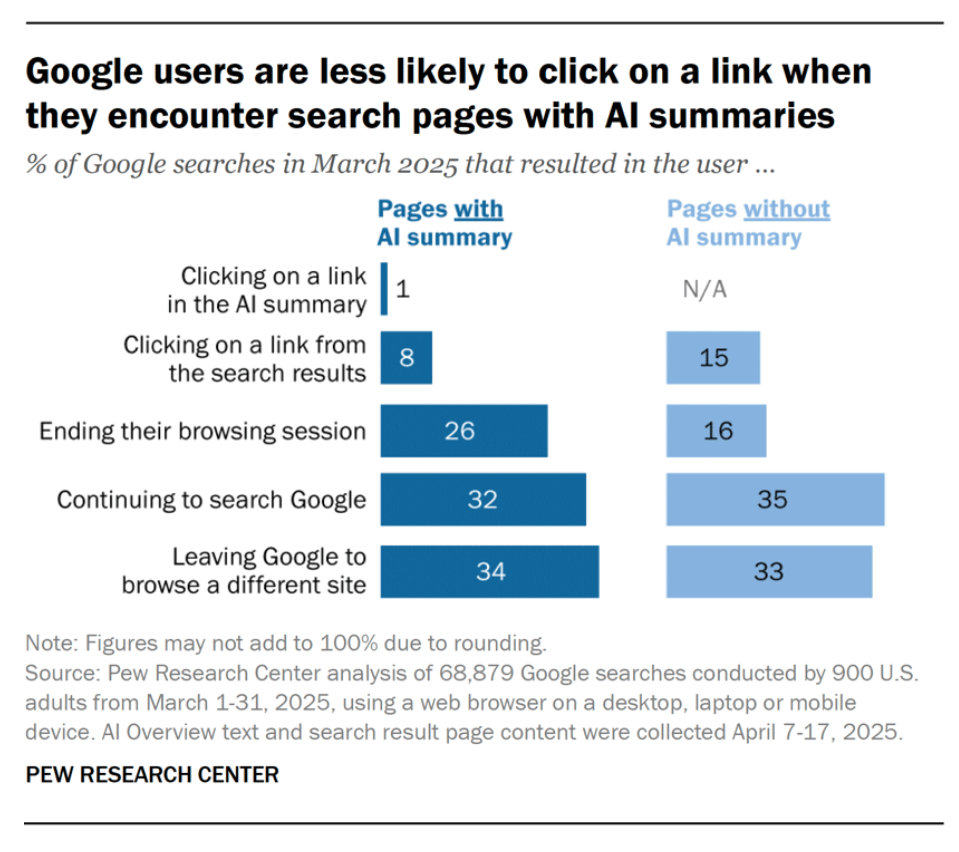
Clear, accurate website information helps Google understand your business, although it doesn’t guarantee inclusion in an AI Overview.
How the different search results compare
| Result type | What influences visibility | What you can do |
| Google Search Ads | Bids, relevance, and ad quality | Set targeting, budget, and messaging |
| Local Services Ads | Eligibility, verification, and ranking factors | Meet requirements and maintain your profile |
| Google map pack | Relevance, distance, and prominence | Update business details and earn genuine reviews |
| Organic results | Content relevance, quality, and SEO | Improve service pages and website performance |
| AI Overviews | Pages that are indexed and eligible to show with a snippet | Answer customer questions clearly on pages Google can crawl |
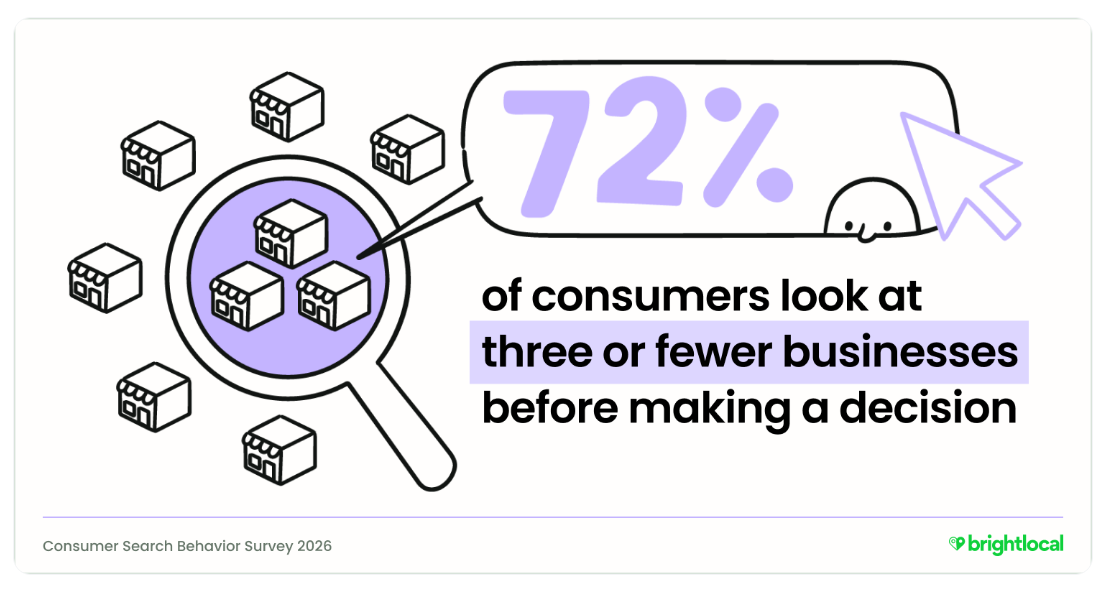
According to BrightLocal’s 2026 research, 72% of consumers consider three or fewer businesses before deciding. When customers only look at a few businesses, your listing and reviews have to make the case at a glance.
Wondering why competitors show up before you?
Enter your website to get a free AI Digital Marketing Score and a downloadable report that checks your website and your online listings.
How do AI tools choose which businesses to recommend?
AI tools build their recommendation from what they can find about a business online, such as its website and its reviews. The clearer that information is about what you do and where you work, the easier it is for them to recommend you. Customers can ask AI tools questions like “Which HVAC companies serve my area?” and receive business recommendations directly in the response. These answers may highlight a few businesses and explain what services they offer.
AI assistants such as ChatGPT use large language models (LLMs) to interpret user queries and generate responses. Depending on the platform and available search capabilities, they may use different data sources, including business websites, online listings, reviews, and other publicly available information. For example, ChatGPT can search the web for current information.
Free Guide: The Best Free AI Tools for Small Businesses in 2026
Free Guide
Free Guide: The Best Free AI Tools for Small Businesses in 2026
Discover the AI tools that can help your small business get found online, save time, improve customer engagement, and generate more leads. This practical guide breaks down where popular AI tools can make the biggest impact and how to choose the right solutions without adding unnecessary complexity to your tech stack.
This makes answer engine optimization (AEO) another consideration for local businesses. AEO involves making your online information clear and useful, so AI-powered systems can better understand your business and potentially include it in relevant answers.
For example, if someone asks an AI assistant to recommend companies that repair tankless water heaters in their town, a detailed service page that mentions tankless water heater repairs and the areas served provides more useful information than a website that simply says “full-service plumbing.”
The key is giving these systems specific, accurate information about what your business does and where it operates. Each AI tool picks its own sources, so no business can guarantee an AI recommendation or citation.
How can you show up when customers search?
The best place to start depends on what’s keeping customers from finding or contacting your business. Check where your business currently appears, then focus on the issue that’s most likely to affect your visibility or customer inquiries.
Check your Google Business Profile first
Search Google for your business name and see whether your Google Business Profile appears. If it doesn’t, you may need to create or verify it. If it’s verified but still missing, check whether Google has suspended or disabled it.
If it does appear, make sure your primary business category, services, hours, phone number, and service area are correct. Add recent photos of your work and update your profile whenever business details change. Here is how to optimize your Google Business Profile.
Make sure your business information matches across listings
Check your business details on Google, Bing, Yelp, and other industry-relevant directories. Look for outdated phone numbers, incorrect hours, or inconsistent business names.
For example, if a customer finds an old phone number on Yelp, you could lose a potential job before they ever reach you.
Prioritize listings customers are most likely to use. Thryv’s online listings management helps you keep business information accurate across supported directories, reducing the need to update each listing manually.
Free Guide: The Three Essentials of Modern Marketing
Free Guide
Free Guide: The Three Essentials of Modern Marketing
Build a smarter marketing system that helps your business get found online, generate more qualified leads, and create better visibility into your leads. Learn the three core strategies modern small businesses need to simplify marketing, improve results, and drive sustainable growth with AI-powered tools.
Make your website clear about what you do and where you work
Review your website from a customer’s perspective. Can someone quickly tell which services you offer, where you work, and how to contact you?
If you run a landscaping business that offers drainage solutions, for example, create a dedicated page explaining the drainage problems you address and the areas you serve. A general “Our Services” page may not provide enough detail for customers or search engines.
Technical SEO helps search engines access and understand your website. It includes tasks like making sure important pages can be crawled and adding schema markup, a form of structured data that helps search engines interpret information about your business. Clear service descriptions and accurate contact information should still be your priority.
Make your phone number and contact options easy to find, especially on mobile devices. A straightforward user experience helps interested customers take the next step without searching for your contact details.
Build trust with genuine customer reviews
Ask satisfied customers to leave honest reviews after completing a job. Respond to feedback regularly, including negative reviews, to show potential customers that you pay attention to their experience.
Reviews can influence local search visibility and help customers decide which business to contact. Learn more about why online reviews matter for local SEO.
If requesting and responding to reviews is taking too much time, Thryv’s reputation management software can help you manage review requests and responses more efficiently.
Get the steps as a checklist
Download the free Small Business SEO & AEO Visibility Checklist and work through it all at your own pace.
Get found without becoming a search expert
Once you’ve addressed missing or inaccurate business information, maintaining your visibility requires ongoing attention. Search behavior, local competition, and the information customers look for can change, and keeping your website optimized takes time.
If you’d rather hand off that work, Search Boosts adds expert-managed SEO and AEO to the Thryv platform. Thryv’s experts handle the strategy and the ongoing optimization, and you get regular reports on your traffic and rankings. You decide how much to hand off. Some owners keep managing their listings and reviews in Thryv and let the experts take care of search.
K&L Roofing in Maryville, TN, went from page 5 to page 1 on Google in its primary service area in under 4 months after Thryv took over its website and SEO.
Ready to get found by more customers?
Book a demo to see how Search Boosts handles your SEO and AEO, so you can focus on running your business.
FAQs about search engines
A web browser is an application you use to access websites, while a search engine helps you find information online. For example, Google Chrome is a browser, and Google Search is a search engine. You can use Chrome to search with Google, Bing, or DuckDuckGo, depending on your preferences.
Google is the most widely used search engine worldwide, followed by alternatives such as Bing, Yahoo, and DuckDuckGo. Their popularity varies by country and device. For local businesses, Google is generally the best place to start improving search visibility, although keeping your information accurate across other search platforms is also worthwhile.
Not in the traditional sense. ChatGPT is an AI assistant that can answer questions and search the web for information. Traditional search engines generally organize results around websites and other search features, while ChatGPT provides conversational responses that may include recommendations and links to sources. Its methods for retrieving and presenting information differ from Google’s.
No. Paying for Google Ads doesn’t directly improve your website’s organic search rankings. Google’s advertising and organic ranking systems operate separately. Ads can help your business appear for relevant searches while you work on improving your website’s unpaid search visibility through SEO.
Yes. Eligible businesses can appear in Google Search and Google Maps through a Google Business Profile, even without a website. Your profile can display your business hours, phone number, services, and customer reviews. However, having a website gives you more opportunities to explain your services, answer customer questions, and appear in organic search results across search engines.
Google may discover and index new website pages within a few days, but the process can take several weeks or longer. Some pages may never be indexed. You can use the free Google Search Console tool to check whether your pages are indexed and request indexing for eligible URLs. Keep in mind that appearing in Google’s index doesn’t guarantee a high ranking.