
You finish a long HVAC job, check your phone, and notice a missed call. By the time you call back, the homeowner has already booked someone else. What happened in between usually goes unseen. They searched, compared a few HVAC service providers, and checked social profiles to decide who felt reliable. Yours hadn’t been updated in weeks, and that was enough to move on.
This is where HVAC social media marketing starts to matter more than most owners expect. Customers are making quick decisions based on what they see online, and your social presence plays a role in that choice. When profiles look inactive or messages go unanswered, jobs can be lost before you even have a chance to speak with the customer. Over time, those missed opportunities can add up, especially during busy seasons.
This guide breaks down how to make social media work in a way that fits your day. You’ll learn what to post, where your customers are paying attention, how posts turn into real service calls, and how to keep everything running without adding more pressure to your schedule.
Key Takeaways
- An inactive social profile can cost you jobs before the phone ever rings
- Posting one completed job and one customer comment each week is enough to stay visible and trustworthy in your local area
- Customers often choose the HVAC company that looks most active and responsive online
- Clear contact details and fast replies help turn social views into booked service calls
- A simple system makes social media manageable without taking time away from your work
- AI-powered tools from Thryv® can help you stay active, respond faster, and capture more of the jobs already coming your way
Table of Contents
- Homeowners Are Checking Your HVAC Business Before They Call
- What HVAC Companies Should Actually Post on Social Media
- Where Your HVAC Customers Spend Time on Social Media
- 10 HVAC Social Media Marketing Ideas That Generate Real Leads
- How to Turn HVAC Social Media Into Booked Service Calls
- Social Media Doesn’t Stop When You’re on a Job — But It Can Run Without You
- FAQs About HVAC Social Media Marketing
- Turn Your HVAC Social Media Into a Consistent Lead Engine
Homeowners Are Checking Your HVAC Business Before They Call
It’s the middle of January, and a homeowner wakes up to a cold house. They grab their phone, search for HVAC repair, and open a few options. Before calling, they check social profiles to see who looks reliable.
One company has recent posts, customer comments, and replies. Another hasn’t posted in weeks and hasn’t responded to questions. The decision gets made right there.
About 84% of consumers search for local businesses online every day, according to Rio SEO’s 2025 study. That search doesn’t stop at listings. It moves across reviews, photos, and social profiles to confirm who feels trustworthy.
Search and social now work together. A homeowner might find you in search, then check your social to decide if they should call. In many cases, they’re only looking at a few businesses before making that decision, so what they see has to be clear right away.
For HVAC businesses, this is happening whether you’re paying attention to it or not. Your social profiles are part of how homeowners decide who to trust before they call. Many owners start by exploring HVAC small business software, so that what customers see actually supports the work you’re doing in the field.
What HVAC Companies Should Actually Post on Social Media
You finish a job, get back in the truck, and head to the next call. By the end of the day, you’ve handled real work that could help bring in more customers, but none of it shows up online.
That’s where a lot of opportunities get missed.
If you’re not sure where to start, keep it simple. After your next job, take one photo, write one sentence about what you fixed, and post it. It takes less than two minutes and gives potential customers a clear reason to choose you.
From there, you can build a simple social media marketing plan around the work you’re already doing. You don’t need to chase trending topics or post constantly across every platform. Focus on what your target audience actually cares about when they’re deciding who to call.
Completed Jobs
You replace a failed AC unit during a heatwave. The homeowner is relieved, and the system is running again. That moment is worth sharing.
A simple post shows you’re active and handling real problems people are dealing with right now. It also helps future customers recognize that you’ve solved the exact issue they’re facing.
Example caption: “Installed a new AC system today after a full breakdown. Homeowner called this morning, and now they’re back up and running before the heat hits tomorrow.”
Posts like this tend to perform well across social networks because they show real results without needing much explanation.
Seasonal Reminders and Maintenance Tips
The first cold week hits, and service calls start picking up. Some homeowners waited too long to check their system. Posting simple reminders keeps your name in front of customers before problems turn into emergencies.
Example caption: “Temperatures are dropping this week. If you haven’t had your furnace checked yet, now’s the time before the first cold night catches you off guard.”
These posts help you stay ahead of demand and bring in work before schedules fill up.
Customer Reviews and Testimonials
You finish a repair, and the customer leaves a five-star review. That feedback can help win your next job if people see it. Sharing real customer experiences gives homeowners confidence before they ever reach out.
Example caption: “Appreciate the kind words from today’s customer. We were able to get their heat back on the same day. Glad we could help.”
Reviews carry more weight than most people think. According to SOCi’s 2026 Local Visibility Index, businesses that get recommended tend to sit around a 4.2 to 4.3-star rating. If your reviews slow down or you stop responding, fewer customers feel confident choosing you.
Staying consistent with reviews also supports your visibility. When paired with tools like reputation management software, it becomes easier to request feedback after each job and respond without falling behind.
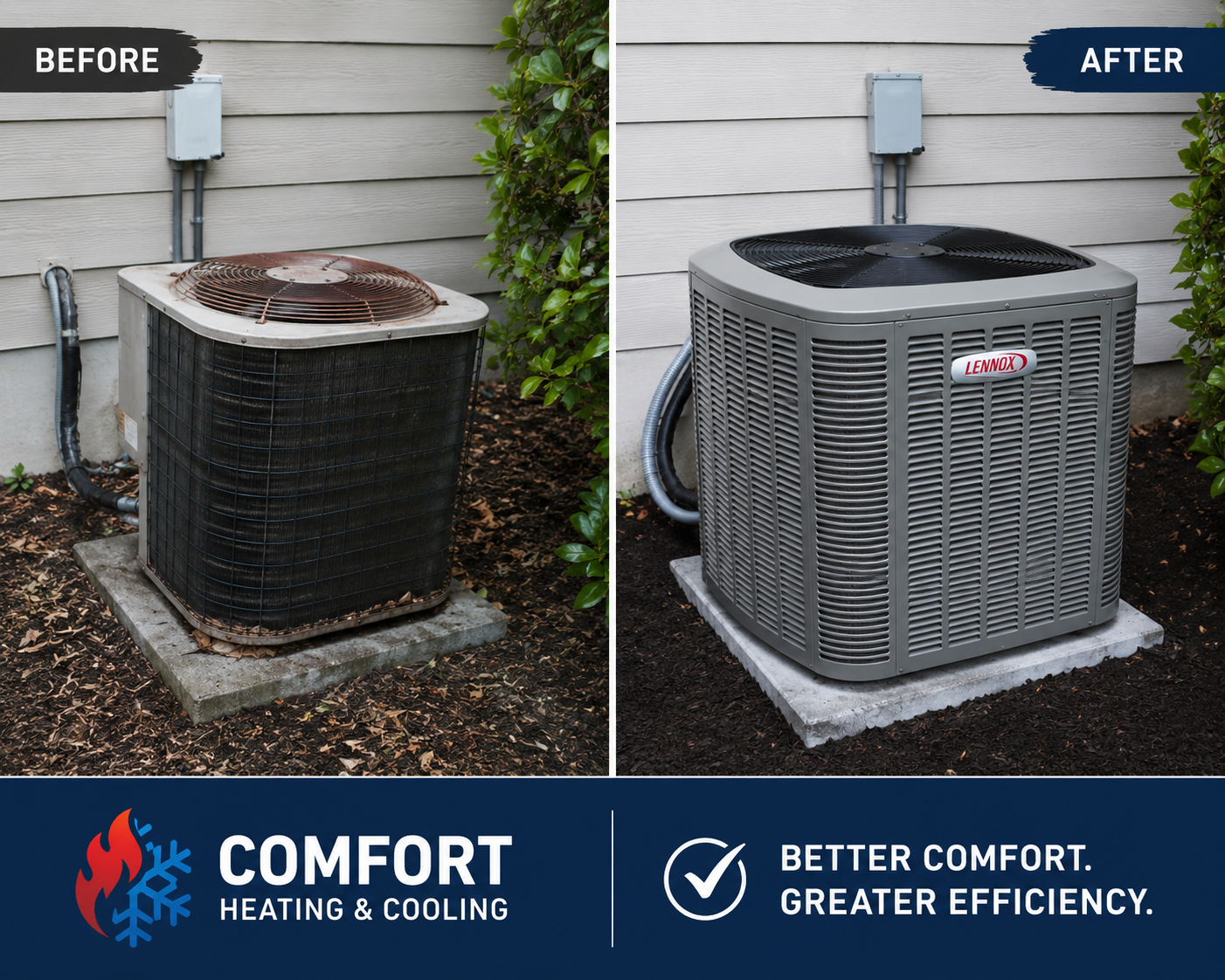
Before and After
You walk into a home with poor airflow or an outdated system. By the time you leave, the difference is clear. That transformation tells a story without much explanation.
Example caption: “Before and after from today’s ductwork replacement. Airflow issues fixed and system running efficiently again.”
Before-and-after posts make it easier for homeowners to picture the results in their own home and understand the value of the work.
Common Customer Questions
You answer the same questions on service calls week after week. Instead of repeating those conversations one at a time, you can turn them into posts that help future customers. This approach saves time and puts helpful information in front of people before they even pick up the phone.
Example caption: “Why does my AC keep running but not cooling? This usually comes down to airflow issues or low refrigerant. If this sounds familiar, it’s worth getting it checked before it gets worse.”
Posts like this tend to reach homeowners who are already dealing with the issue, which makes them more likely to call. If writing these feels like one more task at the end of the day, Thryv’s AI Content Assistant can take a quick note about a job or question and turn it into a caption you can post right away.
Behind the Scenes and Team Posts
A homeowner lets you into their home. They want to know who they’re working with. A quick post about your team builds familiarity and trust before the first call.
Example caption: “Meet Jake. He’s been handling HVAC installs for over 8 years and takes pride in getting every job done right the first time.”
These posts help your business feel more approachable and make it easier for customers to feel comfortable reaching out.
| Content Type | Example | Why It Works |
| Completed Jobs | Share photos and short updates from recent installs, repairs, or maintenance calls | Shows potential customers the real work you handle every day and builds trust with your target audience |
| Seasonal Reminders and Maintenance Tips | Post reminders before summer and winter, along with simple maintenance advice | Keeps your business visible on social networks before customers need emergency service |
| Customer Reviews and Testimonials | Share recent reviews and customer feedback after completed jobs | Builds credibility and supports referral programs by showing real customer experiences |
| Before and After | Show visible improvements from repairs, replacements, or airflow fixes | Helps homeowners quickly understand the value of your work |
| Common Customer Questions | Turn repeated service questions into quick educational posts | Helps you stay visible around trending topics and reach customers already searching for answers |
| Behind the Scenes and Team Posts | Introduce technicians, team members, or day-to-day work moments | Makes your business feel more approachable and helps customers feel comfortable calling |
If you’re short on time, start here: Take one photo after your next job, write one sentence about what you fixed, and post it. That takes less than two minutes and puts your business in front of people searching for HVAC services in your area. It’s the same thinking behind proven HVAC marketing ideas that turn everyday work into steady demand.
Where Your HVAC Customers Spend Time on Social Media
Trying to manage multiple social platforms at once usually leads to missed posts and unanswered messages. When your day is spent handling HVAC services in the field, it’s easy for things to fall behind.
You don’t need to be everywhere. It’s more effective to focus on the platforms your customers already use when they’re deciding who to call.
Facebook for Local Visibility and Homeowner Trust
Facebook is often where homeowners validate what they found on search engines. They want to see recent activity, customer interactions, and real jobs.
Example post: “Furnace repair completed this morning. Homeowner had no heat overnight and is back up and running today.”
This works because it shows real, recent work and helps convert search traffic into actual calls.
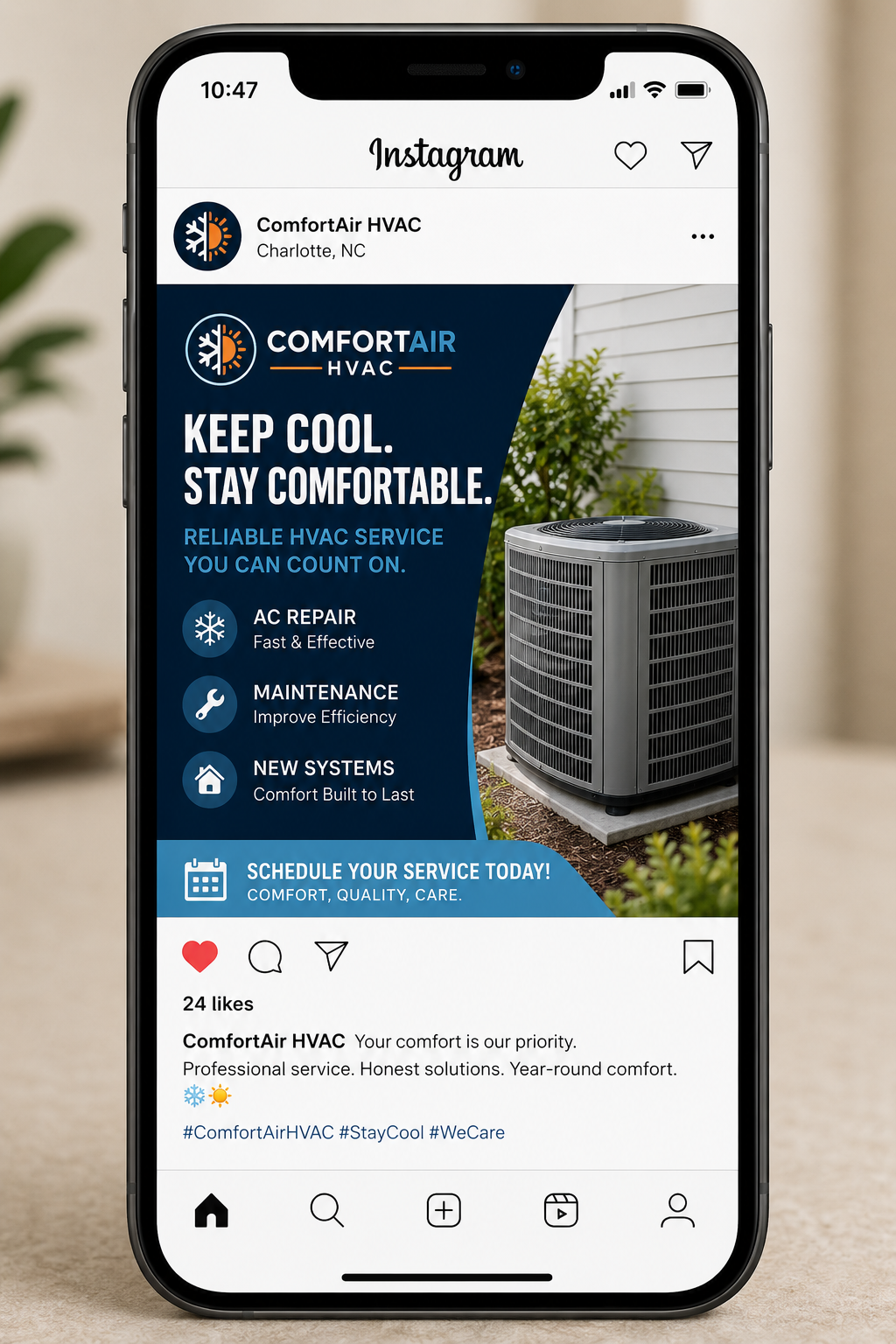
Instagram for Visual Proof of Your Work
Instagram works best when your work speaks for itself. Homeowners scrolling through social media are looking for quick proof that you handle jobs like theirs.
Focus on:
- Before-and-after photos
- Installs
- Clean job sites
Example post: “New air conditioning system installed today. The old unit was struggling to keep up. Homeowner now ready for the weekend heat.”
Posts like this give people a clear sense of what you do and help them feel confident reaching out.
YouTube for Long-Form Trust Building
YouTube works when customers are trying to understand a problem before calling. Keep videos simple and short: 1–3 minutes, one question per video.
Example: “What causes an AC to stop cooling, and when to call for repair.”
If someone watches your video and still needs help, they’re more likely to call you. This supports both local SEO and long-term lead generation.
GBP for Local Presence
Your Google Business Profile connects directly to search engines and local SEO. Posting updates here helps your business show up more often and gives customers a clear path to call.
Example post: “Same-day HVAC maintenance completed this morning. Availability open this week.”
Keeping this profile active supports everything else you’re doing online. If you’re just getting started, pick one platform and spend 10–15 minutes after your last job posting on one update. That’s enough to start bringing in more calls within a few weeks.
If keeping up with posts and messages across platforms feels like one more thing to manage, that’s where tools can help. Instead of logging into each platform separately, many HVAC businesses use solutions like social media management software to schedule posts ahead of time and keep track of incoming messages in one place.
With Thryv, for example, when a new message comes in from Facebook or Google, it shows up in one inbox on your phone. You can reply between jobs instead of missing it and losing the opportunity.
Managing Multiple Platforms Doesn’t Have to Be Time-Consuming
Thryv helps HVAC businesses schedule posts, manage conversations, and stay visible across social media from one unified platform.
10 HVAC Social Media Marketing Ideas That Generate Real Leads
A lot of social media ideas sound useful when you read them, but they don’t always translate into something you can actually post after a long day of HVAC work. These ideas are different. Each one is built around the work you’re already doing, so you can post quickly without overthinking it. In most cases, you can put something together in a few minutes right after finishing a job.
1. Before-and-after from your latest job
“AC replacement completed today. The system was down this morning and is now cooling before the weekend heat.” Homeowners can immediately recognize the situation and see the result, which makes it easier for them to picture you solving the same issue in their home.
2. Seasonal readiness reminder
“Cold weather coming this week. If your furnace hasn’t been checked, now’s the time.”
These reminders tend to bring in work earlier, before systems fail and schedules fill up.
3. Share a recent five-star review
“Appreciate the kind words. Glad we could get your heat back on the same day.” Customer testimonials help people feel more confident choosing you, especially when they’re comparing a few local HVAC service providers.
4. Answer a common service call question
“AC running but not cooling? Often, airflow or refrigerant. Worth checking before it gets worse.” Posts like this connect with homeowners who are already dealing with the issue, which often leads to quicker calls.
5. Introduce a team member
“Meet Chris. 9 years of experience handling installs and repairs.” Putting a face to your business helps customers feel more comfortable reaching out.
6. Share An AC Tune-Up Checklist
“Here’s what we check during an HVAC maintenance visit.” This gives customers a clearer sense of what they’re paying for. If putting something like this together slows you down, tools like ImageAI can create a simple visual AI Content Assistant, and CaptionAI can turn it into a ready-to-post caption.
7. Before-and-after of ductwork or airflow issues
“Duct cleaning completed today. Airflow improved across the home.” These posts help explain services that aren’t always top of mind for homeowners but still lead to real work.
8. Tie into local weather
“95-degree temps this week. We’re seeing more AC breakdowns.” Connecting your posts to what’s happening locally makes them feel more relevant and timely.
9. Promote availability
“HVAC services available this week. Call or message to book.” Sometimes the simplest posts are the most effective because they give people a clear next step.
10. Ask a simple question
“Have you had your HVAC system serviced in the last 12 months?” Questions like this prompt people to think about their system and often lead to messages or calls.
If you’re not sure where to start, keep it simple. Post one job this week. That alone is often enough to bring in a few extra calls and get momentum going.
How to Turn HVAC Social Media Into Booked Service Calls
You can post regularly and still not see more calls. The difference usually comes down to what happens after someone sees your post.
Small adjustments in how you handle responses, contact options, and follow-up can make a noticeable difference – especially during busy seasons when customers are making fast decisions.
Optimize Your Profile Contact Information
A homeowner clicks your profile because your post caught their attention. They’re ready to call, but your phone number is missing or outdated. That’s a lost job. Make sure your phone number, service area, and hours are accurate across every platform. Keeping that information consistent is part of staying visible, especially when it connects with tools like business listings management software that help keep your details updated everywhere customers search.
Add Contact Buttons and Booking Links
A homeowner sees your post and is ready to reach out. If there’s no clear way to contact you, that job can go somewhere else.
Example: After posting a repair: “Same-day HVAC services available. Call or message to book.”
Add a “Call Now” or message option to your profile and include it in your posts. This reduces friction and helps turn interest into actual service calls.
Respond Quickly to Messages and Comments
A customer sends a message asking if you’re available. If they don’t hear back, they keep looking. Speed matters here. Even a short reply keeps you in the conversation.
Example: “Finishing a job now. I’ll call you in 20 minutes.”
With Thryv’s AI Lead Insights, if a message comes in while you’re on a job, it can trigger an automatic reply so the customer knows you’re getting back to them. That keeps them from moving on while you finish your current job.
Use Local Hashtags and Geotags
When someone nearby is searching or browsing, location matters. If your post isn’t tied to your service area, fewer local customers see it.
Example: “AC repair completed in Plano this morning.”
Add your city or service area to posts so they show up in local searches and feeds. This helps your posts reach homeowners who are actually within your service range and more likely to call.
Add a Clear Call to Action in Every Post
A strong post gets attention, but without direction, people move on. Every post should tell the customer what to do next.
Example: After sharing a before-and-after install, add: “Call today to get your system checked before the next heatwave.”
Clear next steps help turn interest into action.
Use AI to Identify Your Best Leads
Not every message turns into a job. Some are just asking questions. Others need immediate service. With Thryv’s AI Lead Flow, messages like “AC not working, need help today” are flagged so you can prioritize them first. That helps you focus on the jobs most likely to book instead of sorting through messages later.
To make it easier to stay organized, many HVAC businesses rely on tools like HVAC business management tools to keep everything in one place and avoid falling behind.
Social Media Doesn’t Stop When You’re on a Job — But It Can Run Without You
You’re on-site fixing a system when a new message comes in. You don’t see it right away, and by the time you check your phone, the customer has already booked someone else. That’s how jobs get lost. It’s rarely about a lack of demand. More often, it comes down to timing and response. When replies are delayed, customers move on.
With the right setup, your social media activity keeps moving even while your schedule is full, so fewer opportunities slip through the cracks.
Post Scheduling and Content Planning
Posting often gets pushed aside once the day picks up. Jobs run long, calls come in, and by the end of the day, it’s easy to skip it.
Batching content once a week makes this manageable. For example, after finishing a few jobs on Friday, you can enter those job details into Thryv’s AI Content Assistant, generate captions for each one, schedule them in one sitting, and they go out automatically during the week. Your business keeps showing up online without needing daily attention.
Multichannel Publishing
You post on one platform but forget the others. Some customers check Facebook, others look at your Google profile, and your activity looks inconsistent depending on where they land.
Publishing across multiple platforms at once keeps your presence aligned. Instead of posting separately, you can share the same job update everywhere, so no matter where a homeowner looks, your business appears active and ready to help.
Centralized Inbox Management
Messages come in from different places throughout the day. Some come through Facebook, others through Google or your website. Without a system, it’s easy to miss one.
With Thryv, those messages show up in a single inbox on your phone. So if a homeowner sends a message while you’re finishing a repair, you can see it right away and respond between jobs. That quick reply often makes the difference between booking the job and losing it.
AI Content Creation and Automation
Coming up with what to post can slow things down, especially after a long day. Instead of starting from scratch, you can use Thryv’s AI Content Assistant to turn simple job details into a finished post. For example, you might enter: “AC repair, no cooling, replaced capacitor,” and get back: “AC repair completed today. System wasn’t cooling due to a failed capacitor. Back up and running before the afternoon heat.”
That saves time and makes it easier to stay consistent without adding more work to your day.
Real-Time Tracking and Analytics
If you’re putting time into posting, it helps to know what’s actually leading to calls. Over time, you’ll start to notice patterns. For example, you might see that before-and-after posts lead to more messages than general tips. That makes it easier to focus on the types of posts that bring in real work.
Mobile Accessibility
Most of your day isn’t spent at a desk. It’s spent on jobs, in your truck, or moving between calls. Having access on your phone means you can check messages, respond quickly, or review posts without falling behind. Even a quick reply between jobs can help you secure work that might have otherwise gone to someone else.
When these pieces are in place, social media becomes something that supports your business instead of something you have to keep up with. It helps you stay visible, respond faster, and turn more of those everyday interactions into real HVAC service calls.
See How a Real HVAC Business Used Smarter Marketing to Win More Customers
Discover how Ely Heating & Cooling used connected marketing tools to attract more customers and grow their business.
FAQs About HVAC Social Media Marketing
Q: How often should HVAC companies post on social media?
A: Two to three posts per week are enough to stay visible and build trust. Consistency matters more than volume, especially when you’re busy with jobs. One completed job post and one customer-related post each week can support your broader digital marketing efforts without taking time away from your day.
Q: Does social media actually work for HVAC companies?
A: Yes, but it works best when it’s tied to real customer decisions. In the HVAC industry, homeowners often check social profiles before calling, so an active presence helps you win more of the calls you’re already getting. It also supports social media advertising by reinforcing trust when potential customers see your posts after clicking an ad.
Q: What should HVAC companies post on social media?
A: Focus on what you’re already doing each day: completed jobs, customer reviews, common questions, and seasonal reminders all help customers decide to call. Adding visual content like before-and-after photos or short clips, along with video testimonials from satisfied customers, can make your posts more convincing and easier to trust.
Q: Can social media generate leads for HVAC businesses?
A: It can, especially when your posts make it easy for someone to take the next step. Clear contact details, quick responses, and simple calls to action help turn views into messages and calls. When paired with HVAC marketing software and booking links, your social media content can drive steady lead generation for your HVAC business.
Q: Do HVAC businesses need social media management tools?
A: You can manage it manually, but it often becomes inconsistent as your schedule fills up. Tools help you schedule posts, keep track of messages, and stay active across platforms without logging into multiple platforms. That consistency supports better customer service and helps you capture more opportunities.
Q: Can AI create social media posts for HVAC companies?
A: Yes, Thryv’s AI Content Assistant and CaptionAI can turn job details or common questions into ready-to-share posts. This saves time at the end of the day to stay consistent with your strategic social media marketing without needing to come up with new ideas from scratch.
Q: How does AI help HVAC businesses generate more leads from social media?
AI helps you respond faster, stay consistent, and focus on the inquiries that are more likely to turn into jobs. For example, Thryv’s AI Lead Insights can highlight new messages that need attention, and the AI Automation Assistant can send quick replies while you’re on a job. That speed improves customer service, helps you capture more leads, and builds customer loyalty over time.
Turn Your HVAC Social Media Into a Consistent Lead Engine
You’re already doing the work. HVAC services are getting completed every day, from emergency repairs to routine maintenance. The next step is making sure more of that work leads to future calls.
Homeowners are checking your business before they reach out. When they see recent posts, customer feedback, and quick responses, they have a clearer reason to choose you.
Consistency is what makes this work. When your posts and responses stay steady, it becomes easier to turn everyday jobs into more calls and repeat business over time. Without a system, it’s easy for things to slip through the cracks. Posts get skipped, messages get missed, and those opportunities go elsewhere.
With Thryv, that process becomes easier to manage. For example, after finishing an air conditioning repair, you can use the AI Content Assistant to generate a post, schedule it for later in the week, and respond to new messages from your phone while heading to your next job. Over time, that turns the work you’re already doing into more steady calls without adding extra pressure to your day.
If you want to see how that works in your business, start a free trial to see how Thryv can help you get found and stay visible online.
Your HVAC Social Media Presence Should Be Winning Jobs, Not Losing Them
Thryv helps you stay visible, respond faster, and turn more social media activity into real HVAC service calls — even when you’re out on a job.