
Local City SEO: How to Rank Higher in Your City
Try Thryv for FreeBy Allison Sakounthong, Small Business Expert
Updated October 12, 2026 · 35 min read
Key Takeaways
- Optimize your Google Business Profile. Keep your business information, services, hours, categories, and service areas accurate and up to date to improve your chances of appearing in relevant local searches.
- Keep your online presence consistent. Make sure your business name, address, phone number, hours, and website match across directories and platforms. Consistent information helps customers, search engines, and AI tools verify your business.
- Build trust with reviews and local content. Encourage recent customer reviews, respond to feedback, and create helpful service and city pages that explain what you offer and where you work. Genuine local content and customer experiences help distinguish your business from competitors.
- Strengthen your local authority and website SEO. Use clear page titles, accurate business information, structured data, and credible local backlinks to help search engines understand your business and its connection to your service area.
- Track visibility alongside business results. Monitor local rankings, search impressions, website traffic, Google Business Profile interactions, calls, and booked jobs to understand whether your SEO efforts are attracting customers and generating business.
A customer a few miles away just searched for the service you offer. In the near-me search, three businesses showed up – yours wasn’t one of them. One of those three gets the call.
Not showing up usually has nothing to do with the quality of your work. Local rankings depend on how clearly and consistently your business establishes its connection to your city. Google looks at information across your Google Business Profile (formerly Google My Business), website, reviews, business listings, and other sources to determine when your business is relevant to a local search.
When those details are incomplete, outdated, or inconsistent, your local signals weaken, and your visibility can suffer. AI search engines like ChatGPT, Claude, Perplexity, and Google AI Overviews may also use information from your website, listings, online reviews, and other sources to understand your business and the areas you serve. However, their systems work differently from Google Search.
What is Local City SEO?
Local city SEO is the process of optimizing your business’s visibility when people search for products or services in a specific city or nearby area.
For example, a plumber in Boston may want to appear when someone searches for “plumber in Boston,” “emergency plumber near me,” or simply “plumber” while searching from Boston.
Try the New Thryv Experience
See what’s new — and why it gives your business an edge.
Traditional SEO vs. Local City SEO: What’s the Difference?
Traditional SEO may target a broad search such as “how often should I service my AC?” Local city SEO focuses on searches where location affects the results, such as “AC repair in Phoenix” or “AC repair near me.”
Customers don’t always have to name the city. Google can use their location to interpret searches with local intent and return businesses relevant to the area. Local SEO can influence visibility in the Google Local Pack, Google Maps, and local search results, including near me searches.
How Local City SEO Works: The Google Local Pack
When someone searches for a nearby business, Google’s Local Pack has to decide which local options to show and how to order them.
The Three Google Local Pack Factors: Relevance, Distance, Prominence
Local results draw on several Google SEO ranking factors, but they are primarily based on three.
- Relevance: How well your Business Profile matches what someone is searching for. Complete, detailed business information helps Google better understand your business and match it to relevant searches.
- Distance: How far your business is from the location used in the search. If a customer doesn’t specify a location, Google calculates distance based on what it knows about their location.
- Prominence: How well known a business is. Google considers information about a business from across the web, including links, articles, directories, and reviews. Review count and ratings can also factor into local search ranking.
You have more control over some of these factors than others. You can’t change where a customer is searching from, for example, but you can give Google clearer information about your services and location and build your business’s reputation online.

Small Business SEO & AEO Visibility Checklist
Free Guide
Small Business SEO & AEO Visibility Checklist
Optimize your business for search engines, AI answers, and zero-click discovery. Use this step-by-step checklist to improve visibility, strengthen trust signals, and turn online searches into real customer inquiries.
How AI-Powered Search Can Surface Local Businesses
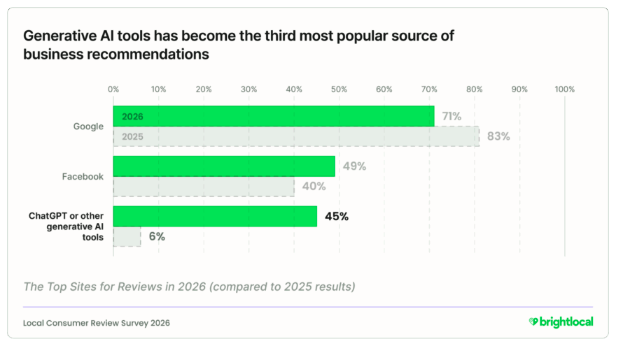
Local discovery is also expanding beyond traditional search. BrightLocal found that 45% of consumers use ChatGPT and other generative AI tools for local business recommendations in 2026, up from 6% the previous year.
AI also changes how customers can frame their searches. Instead of entering “plumber in Chicago,” someone might ask for “an affordable plumber in Chicago who works on older homes and has strong recent online reviews.” A single query can include location, service requirements, reputation, and other preferences that might previously have required several searches.
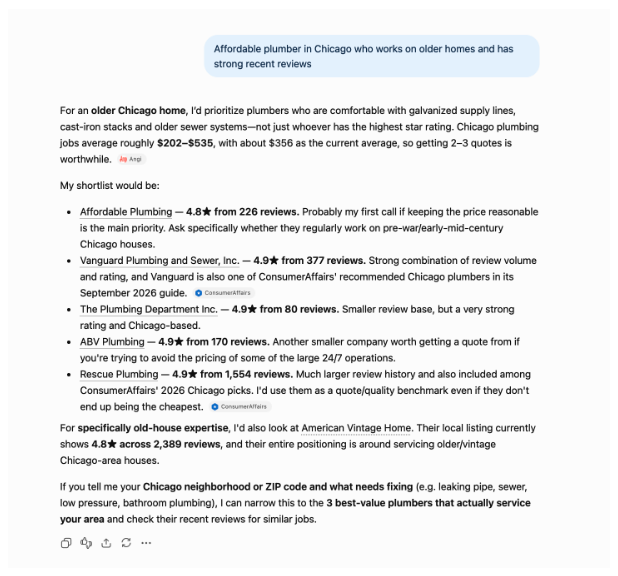
These recommendations don’t follow Google’s Local Pack rules. No single published local-ranking formula tells a business exactly what it needs to do to appear when someone asks an AI tool for a recommendation. The relationship between SEO, AEO, and GEO explains why the same information can still support your visibility in both places.
That puts a premium on making your information easy to verify. When your website, your listings, your reviews, and reputable third-party sources all tell the same story about who you are and where you work, an AI tool can recommend you with more confidence. When those sources disagree, you become a riskier pick, and the tool may reach for a competitor whose details line up cleanly.
The 7-Step Local City SEO Checklist
These seven steps cover what you can directly manage, from your Google Business Profile to how you track results. They are listed in order of priority:
1. Claim and Optimize Your Google Business Profile
Start by claiming your Google Business Profile, then make sure it gives customers an accurate picture of your business.
Verify your:
- Business name, address, and phone number
- Primary and secondary categories
- Business hours and holiday hours
- Service areas
- Services and business description
- Photos
Choose categories that accurately describe what you do and keep the profile current as your hours, services, or coverage area change. These details help Google understand when your business is relevant to a local search and give potential customers the information they need before calling, visiting, or booking.
If you already have a profile, treat this as an audit rather than a one-time setup. Check it periodically for outdated information, missing fields, and business changes.
2. Keep Your Business Information Consistent Across the Web
Your business information may appear on Google, Bing, Apple Maps, Yelp, Facebook, business directories, and other sites. Audit these listings to ensure customers find the same core information wherever they encounter you.
Pay particular attention to your name, address, and phone number (NAP), along with your hours, website, and service areas. Correct outdated listings and remove or resolve duplicates where possible.
This matters even more as local discovery spreads across more platforms. BrightLocal found that consumers used an average of six review sites when choosing businesses in 2026. The company also recommends monitoring listings for inaccuracies and building local citations on relevant local and industry sites as AI tools become another source of recommendations.
If you have dozens of listings to maintain, business listings management software can make this easier by letting you update business information across multiple platforms from one place.
Which local signals are costing you online visibility?
Enter your website URL to get a free AI Digital Marketing Score and a personalized report to see where your local presence needs work.
3. Build Strong Reviews and Respond to Customers
Make review generation part of your regular customer follow-up. After completing a job or service, send customers a direct link to leave feedback while the experience is still fresh. The free Google review link generator creates a link you can share with customers to take them directly to your Google review page.
Recent reviews matter to potential customers. In BrightLocal’s 2026 survey, 74% of consumers said they seek reviews written in the past three months, while 47% would not use a business with fewer than 20 reviews.
Respond to the reviews you receive as well. A quick, specific response shows prospective customers that your business is active and paying attention. Avoid copying the same generic response onto every review. Half of consumers surveyed said templated or generic responses would make them less likely to choose a business. Not sure what to write? These review response templates give you a structure to personalize your response.
Negative reviews deserve extra care, as your reply is read by the customer who complained and the next customer you want to attract. Use these examples and templates for responding to negative reviews.
The goal is to build a steady history of genuine customer feedback rather than collecting a large number of reviews all at once. Reputation management software for small businesses helps you monitor your online reputation and respond across sites from one place.
4. Strengthen Your Service and City Content
Your website should clearly show what you offer and where you offer it. Start with dedicated pages for your core services, then add location-specific content where it genuinely helps customers understand your coverage.
For example, an HVAC company serving Phoenix and several surrounding cities could explain which services are available in each area, include examples of local jobs, and answer questions specific to customers there.
If you create individual city or location pages, give each one useful local information. Consider including:
- Services available in that location
- Examples of work completed nearby
- Areas or neighborhoods you serve
- Location-specific scheduling or service details
- Relevant customer testimonials
- FAQs based on questions you receive from customers in that area
Avoid producing dozens of nearly identical pages with only the city name changed. A useful city page should give someone in that location information they wouldn’t get from a generic service page.
Link your location pages to your main service pages with clear internal links, so customers and search engines can move between them easily. A clean URL structure, like yoursite.com/plumbing/phoenix, also helps both understand how your pages relate. A website builder for small businesses makes it easier to keep these service and location pages current.
Location page work pays off over time. K&L Roofing moved from page five to page one on Google in its primary service area of Maryville, Tennessee, within four months after Thryv took over its website and SEO. The company later expanded into Knoxville while maintaining its local presence.
K&L Roofing’s results are specific to its business and market, but the example shows what stronger website and local SEO work can look like in practice.
5. Check Your Site’s Technical Basics
A few technical elements feed the local signals that Google and AI tools use to understand your business:
- Structured data: a standardized format in your website’s code that helps search engines identify details like your name, address, hours, and reviews. It enables them to read the data reliably.
- Schema markup: the vocabulary most websites use to write that structured data. The most common schema for local SEO is LocalBusiness.
- Title tags and meta descriptions: The title tag summarizes the page content for both search engines and searchers. It can influence rankings. The meta description often appears under the link on a search results page (SERP). While it doesn’t affect rankings directly, it can impact the click-through rate to your site.
Many website builders and SEO tools add this basic structured data for you, so you rarely touch the HTML code yourself. You can check what your site already has with Google’s free Rich Results Test, which shows which structured data it finds and flags any errors. Title tags and meta descriptions are usually editable in your site’s settings. Start with your most important service and city pages.
6. Build Local Authority
Look for credible local websites that have a genuine reason to mention or link to your business. These might include your local chamber of commerce, trade associations, suppliers, community organizations, local publications, or partner businesses.
These mentions can earn you local backlinks, which help establish your connection to the area and build the prominence Google considers in local search. Over time, credible local backlinks can strengthen your site’s overall domain authority.
A roofing company, for example, might be listed in a builders’ association directory, receive a link from a supplier, or earn local coverage for sponsoring a community event.
Focus on relevant, legitimate opportunities. Avoid buying links or adding your business to low-quality websites simply to increase your backlink count.
7. Track Visibility and Business Outcomes
Check your results regularly to understand whether your local SEO work is helping more potential customers find and contact you. Google Search Console shows which search terms bring people to your site, along with impressions and clicks. Google Analytics gives you information about organic traffic to your service and location pages once people arrive.
Start by tracking:
- Search impressions and clicks
- Rankings for important local searches
- Google Business Profile views and interactions
- Organic traffic to your service and city pages
- Calls, form submissions, and appointment requests from local and organic search
- Leads and booked jobs generated through those channels
Don’t judge performance from a single ranking check. Local results can vary depending on where someone searches from, the wording of the query, and the businesses competing for that search. Compare performance over time. Watch whether increased visibility leads to more booked jobs.
Take Local Search Off Your Plate
Thryv’s experts can help strengthen your visibility while you stay focused on running your business.
How to Do Local SEO for Multiple Locations and Service Areas
Local SEO for multiple locations starts with understanding what counts as a separate location. A business with three staffed offices across a city has different Google Business Profile needs from a plumber with one base that serves ten surrounding neighborhoods.
If you operate several eligible, staffed locations, each location should have its own accurate Google Business Profile and a corresponding location page on your website. Each page should contain information that is genuinely useful to customers at that location, such as its address, hours, services, contact details, staff, nearby service areas, and relevant customer reviews or examples of local work.
A service-area business works differently. If you travel to customers and don’t have separate staffed locations, use your Google Business Profile’s service-area settings to identify where you operate. You can still create localized website content for important areas you serve, but avoid creating extra Google Business Profiles for neighborhoods where you don’t have eligible business locations.
| Business situation | Do | Don’t |
| One location serving the whole city | Maintain one accurate profile and clearly explain the areas you serve on your website. | Create extra profiles for individual neighborhoods. |
| Several staffed locations | Maintain an eligible profile and unique website page for each location. | Combine every location into one generic page or let individual profiles become inconsistent. |
| Service-area business with no customer-facing storefront | Set up your profile as a service-area business and specify the areas you serve. | Create profiles for addresses or neighborhoods that aren’t eligible locations. |
As you add locations, multi-location SEO means keeping each location page, profile, and review set organized separately. Thryv’s franchise and multi-location marketing tools are designed for businesses that need to manage work across multiple locations or franchisees from a more centralized system.
Critical Local City SEO Mistakes to Avoid
Trying to rank in more parts of a city can lead to tactics that violate Google’s rules or add little value for customers. Watch for these common mistakes:
- Using locations you don’t genuinely serve: Targeting cities far outside your actual service area can bring irrelevant traffic and make the website less useful to customers trying to determine whether you can serve them.
- Treating local keywords as the whole strategy: Repeating a city name throughout a page won’t make weak content more locally useful. Focus on clearly explaining what you offer in that area and providing information that helps a local customer decide whether to contact you.
- Stuffing keywords into your Google Business Profile name: Use your real-world business name, the one you use on your invoices. Adding service or city terms like “Joe’s HVAC | Emergency HVAC Contractor Atlanta” violates Google’s guidelines and can get your profile suspended.
A useful test is simple: Does this profile or page represent a real part of your business, and would it help someone in that location? If the only reason it exists is to target another local keyword, reconsider whether you need it.
Should You Do Local City SEO Yourself or Get Help?
You can handle many of the day-to-day parts of SEO for small businesses on your own. The question is whether you also have the time and expertise for the work that happens behind the scenes.
| Usually manageable yourself | May be worth getting help with |
| Updating your Google Business Profile | Cleaning up citations across directories |
| Asking customers for reviews | Creating and optimizing service and city content |
| Making basic website updates | Diagnosing technical SEO issues |
| Checking listings for outdated information | Tracking performance across locations |
| Monitoring calls, leads, and rankings | Adapting to changes in search and AI discovery |
Start by identifying the gaps. The Online Presence Scan can show you how your business appears online and help identify areas that need attention. Then you can get an SEO site audit.
From there, decide whether the fixes are realistic to manage alongside your business. A few outdated listings or an incomplete profile may be easy to tackle yourself. Larger citation issues, ongoing content needs, technical problems, or multiple locations can require more sustained work.
If that sounds like too much extra work you don’t have time for or you are not prepared to take on, expert-managed small business SEO services can handle the ongoing SEO and AEO work for you.
Make Your Business Easier to Find in Your Own City
Get an overview of what managed local and AI-powered search looks like for your business.
FAQs About Local City SEO
Yes. Google states that review count and review scores factor into local search ranking. Reviews can also influence whether someone chooses your business after finding it.
Recency matters too: a steady flow of reviews signals an active business. Strong feedback you received years ago doesn’t help much.
Yes, particularly if you genuinely serve customers in that city. Service-area businesses can specify the areas they serve in their Google Business Profile and create useful website content for those locations.
However, serving an area does not make you eligible to create a separate Google Business Profile there. Avoid using virtual offices, fake addresses, or other ineligible locations simply to create additional profiles.
Local SEO can affect visibility beyond the Local Pack. Google can return localized organic results as well as businesses in Maps, so your website can appear for searches where location is relevant.
This is why local SEO includes work on your website alongside Google Business Profile optimization, reviews, and business listings.
Yes, when the location is relevant to the page and useful to someone searching for that service. For example, a page about roofing services in Maryville could naturally include both “roofing” and “Maryville” in its title and main heading.
Avoid forcing city names into every heading or repeating them simply to target a keyword. The page should still read naturally and provide information specific to customers in that area.
Track visibility alongside actual customer actions. Useful metrics include local search rankings, search impressions and clicks, Google Business Profile interactions, organic traffic to important service and city pages, calls, form submissions, appointments, and booked jobs.
Look at trends over time rather than relying on a single ranking check.